Builds & Experiments / Agent Security
How to Write Secure AI Agent Skills
A practical walkthrough for building agent skills with scoped permissions, explicit risk tiers, validation, signing, and security controls that can actually be governed.
By Adam Hall
If you've been paying attention to the AI space, you've probably run into the term "agent skills." Maybe you've installed an AI agent that uses them. What you almost certainly haven't heard is that 36% of scanned AI agent skills contain security flaws, and 13% have critical vulnerabilities (Snyk ToxicSkills, Feb 2026).
That's not a future risk. It's where we are right now.
This walkthrough covers what agent skills actually are, why there's a security gap, and a step-by-step build of a hardened skill — the same framework I use in my own consulting work. If you're building or deploying AI agents and you haven't started thinking about skill security, start here.
What are agent skills, really?
An agent skill is a reusable bundle of instructions, reference material, and (optionally) scripts that an AI agent loads on demand when a task calls for them. The agent doesn't hold every skill in context all the time. It advertises skill names, loads the relevant instructions when triggered, reads any reference docs it needs, and runs scripts only if required.
This four-stage pattern is called progressive disclosure:
- Advertise skill names so the agent knows what's available
- Load instructions from the skill's
SKILL.mdfile - Read bundled reference documents (if the task needs them)
- Run bundled scripts (only when the task requires it)
Microsoft's Agent Framework shipped this pattern as a stable, production-ready API in July 2026 (source). It's the same architecture Hermes, OpenClaw, Claude Code, Cursor, and VS Code all use in some form.
A skill is not a prompt. A prompt is one instruction. A skill is a package: metadata + instructions + reference docs + optional scripts + a permission manifest. The manifest is what makes the skill governable. Without it, the skill is just a markdown file the agent will happily execute.
The problem: a crisis already in progress
The OWASP Agentic Skills Top 10 (AST10), the first formal security framework for agent skills, published in 2026, lays out the numbers. They're ugly.
| Metric | Figure | Source |
|---|---|---|
| Skills with security flaws | 1,467 of 3,984 (36.82%) | Snyk ToxicSkills, Feb 2026 |
| Skills with critical issues | 534 (13.4%) | Snyk ToxicSkills, Feb 2026 |
| Confirmed malicious payloads | 76+ | Snyk ToxicSkills, Feb 2026 |
| Malicious skills in ClawHavoc campaign | 1,184 | Antiy CERT, Feb 2026 |
| Internet-exposed OpenClaw instances | 135,000+ | SecurityScorecard, Feb 2026 |
| CVEs disclosed in OpenClaw alone | 9 (3 with public exploits) | Endor Labs, Feb 2026 |
The ClawHavoc campaign is the one that got everybody's attention. Attackers flooded the ClawHub registry with 1,184 malicious skills in a three-day window. At peak infection, five of the top seven most-downloaded skills were confirmed malware. They targeted SSH credentials, API keys, crypto wallets, browser passwords, and .env files. They also wrote malicious instructions into the agent's own memory files (SOUL.md, MEMORY.md) for session-persistent backdooring — meaning the agent kept running the attacker's payload even after the skill itself was removed.
Microsoft's Defender Security Research Team issued an advisory in February 2026 worth quoting directly: "OpenClaw should be treated as untrusted code execution with persistent credentials. It is not appropriate to run on a standard personal or enterprise workstation."
This is the environment we're deploying into. The LLM layer gets the press. The MCP tool layer gets some attention. The skills behavior layer gets almost none. That's where attackers are currently winning.
The Lethal Trifecta: when skills become dangerous
OWASP and Palo Alto Networks (building on Simon Willison's earlier work) use a mental model they call the Lethal Trifecta. An agent skill becomes especially dangerous when it simultaneously has:
- Access to private data (SSH keys, API credentials, wallet files, browser data)
- Exposure to untrusted content (skill instructions, memory files, email bodies, web pages)
- Ability to communicate externally (network egress, webhook calls,
curlto arbitrary hosts)
Most production agent deployments today check all three boxes.
I use the Trifecta as the first filter when reviewing any skill. Hit all three legs and it's L3 (destructive) by default, with full human approval on every action. Hit zero or one and you're at L0 or L1, where lighter oversight is defensible.
The Universal Skill Format: what a hardened skill looks like
OWASP's Universal Skill Format v1.0 proposal is the closest thing we have to a standard. It's a YAML manifest that sits at the top of a SKILL.md file and addresses the top risks (AST01 through AST10) directly:
permissions.deny_writeprotects identity files (SOUL.md,MEMORY.md,AGENTS.md) by default and requires explicit override.network.allowis a domain allowlist, not a boolean, which closes the "network: true" over-permission gap (AST03).signaturepluscontent_hashtogether enable Merkle-root registry verification (AST01/AST02).scan_statuscreates a machine-readable provenance trail (AST08/AST09).risk_tier(L0 through L3) enables automated governance policies without a human reading the skill's source (AST09/AST10).
Risk tiers, briefly
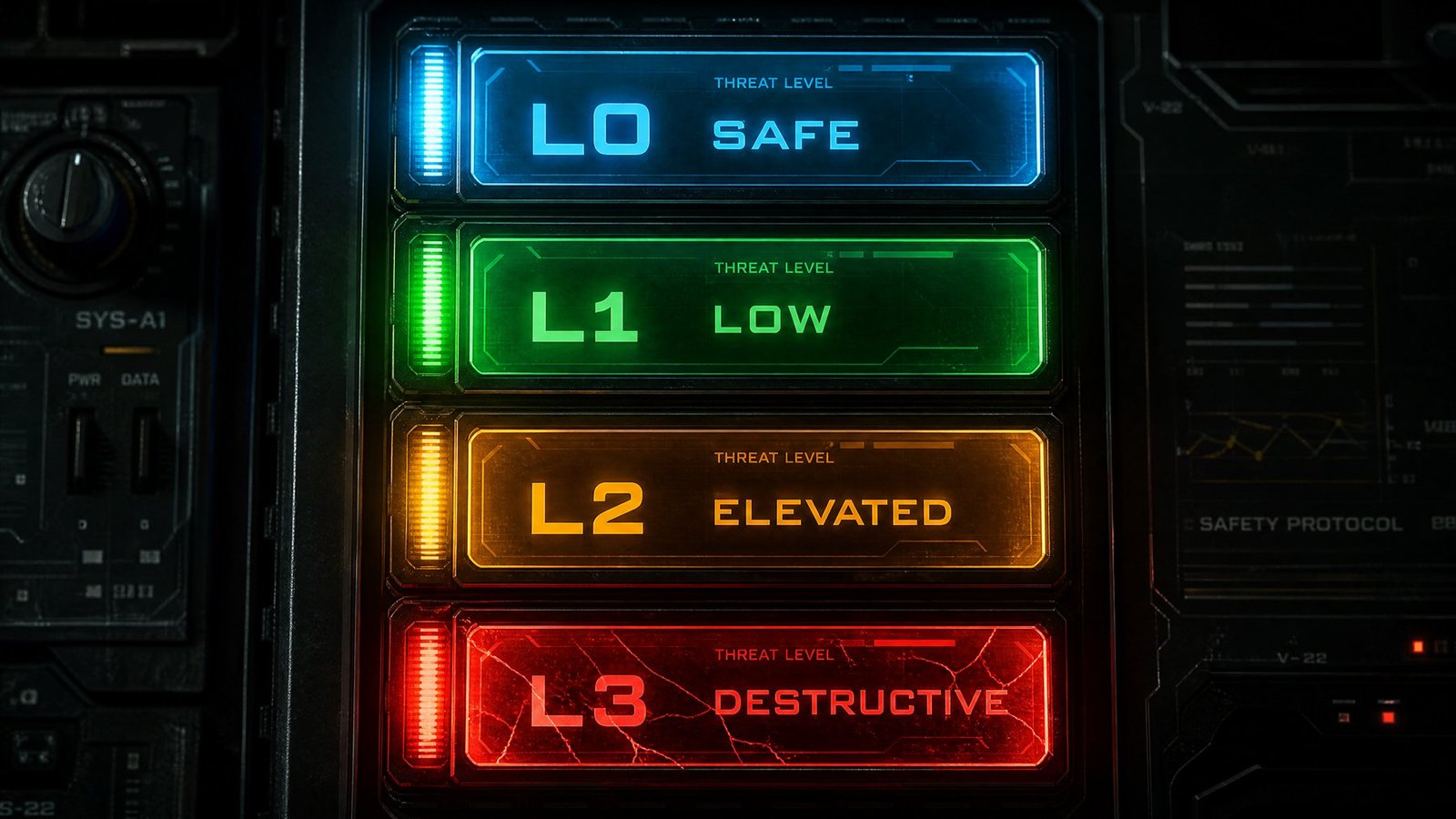
The risk_tier field assigns every skill a blast-radius category so a governance system can make automated decisions without reading the source:
- L0, Safe: Read-only, no network, no script execution. The skill can't change anything outside the agent's context window. A markdown formatter is a typical L0.
- L1, Low: Limited writes to a scoped directory, no network, optional sandboxed validation script. Can touch files on disk but only in a known location. The Daily Note Formatter we're about to build lives here.
- L2, Elevated: Network egress to an explicit allowlist, or script execution that reaches external resources. A skill that pulls a GitHub README and summarizes it is a typical L2.
- L3, Destructive: Unrestricted network, shell access, or writes to sensitive locations (identity files, credentials, system config). These need human approval on every action, often per-tool call, unless you have a very specific reason otherwise.
Most skills should be L0 or L1. If you're about to publish an L3 skill, ask hard questions about whether it actually needs that much power.
The full template:
---
# Universal Agentic Skill Format v1.0
name: example-skill
version: 1.0.0
platforms: [openclaw, claude, cursor, vscode]

description: "Safe example skill — concise, honest statement of function"
author:
  name: "Author Name"
  identity: "did:web:example.com"
  signing_key: "ed25519:pubkey_hex_here"

permissions:
  files:
    read:
      - ~/.config/app.json
    write:
      - ~/.config/app.json
    deny_write:
      - SOUL.md
      - MEMORY.md
      - AGENTS.md
  network:
    allow:
      - api.example.com
    deny: "*"
  shell: false
  tools:
    - web_fetch
    - read_file

requires:
  binaries: [jq, curl]
  min_runtime_version: "2026.1.0"

risk_tier: L1
scan_status:
  scanner: "snyk-agent-scan@1.4.0"
  last_scanned: "2026-02-15"
  result: "pass"

signature: "ed25519:ABCDEF1234567890..."
content_hash: "sha256:abcdef1234..."
---
If you've never seen this before, don't worry. We'll build one from scratch below.
Writing a hardened skill: the Daily Note Formatter
For this walkthrough we'll write a skill every knowledge worker already understands: formatting daily notes. An AI agent that takes meeting notes or end-of-day summaries needs to save them in a consistent structure. The skill tells the agent: when the user asks to save a daily note, here's the template, here's the tagging convention, and here's a small validator script that checks the result before it touches disk.
It's a good demo for three reasons. It's a real skill, not a toy — I use one just like it every day in my own vault. It exercises the full hardening pattern (manifest, reference doc, validation script, permission boundaries) without needing domain expertise to follow. And it sits at the low end of the risk spectrum (L1), so you can see what secure-by-default looks like when the stakes are modest, then scale the same pattern up for higher-risk work.
Step 1: Lay out the skill directory
Skills are directories. Create one with this structure:
daily-note-formatter/
├── SKILL.md                          # main skill file + permission manifest
├── references/
│   └── category-catalog.md          # reference doc the agent loads on demand
└── scripts/
    └── validate_frontmatter.py      # validation script (optional)
The agent discovers SKILL.md first, reads category-catalog.md only when it needs to categorize the note, and runs validate_frontmatter.py only when it's about to write the file. That's progressive disclosure in action.
Step 2: Write the permission manifest
This is where most skills fail before they ever run. The default mistake is over-permission: network: true, write: *, no deny_write on identity files. We do the opposite.
Open SKILL.md and start with the YAML frontmatter:
---
name: daily-note-formatter
version: 1.0.0
platforms: [openclaw, claude, cursor, vscode, hermes]

description: "Format and save a daily note to the user's notes vault with consistent structure, tags, and validated frontmatter."

author:
  name: "Adam"
  identity: "did:web:adamdoesai.com"
  signing_key: "ed25519:YOUR_PUBKEY_HERE"

permissions:
  files:
    read:
      - ~/Notes/Vault/Daily Notes/*.md          # read existing notes for template consistency
      - ~/Notes/Vault/wiki/index.md              # read wiki index for cross-linking
    write:
      - ~/Notes/Vault/Daily Notes/*.md           # ONLY the daily notes directory
    deny_write:
      - SOUL.md
      - MEMORY.md
      - AGENTS.md
      - ~/.ssh/**
      - ~/.aws/credentials
      - .env
  network:
    allow: []                                     # no network — this skill is local-only
    deny: "*"
  shell: false
  tools:
    - read_file
    - write_file

requires:
  binaries: [python3]
  min_runtime_version: "2026.1.0"

risk_tier: L1
scan_status:
  scanner: "manual-review"
  last_scanned: "2026-07-19"
  result: "pass"

signature: "ed25519:YOUR_SIGNATURE_HERE"
content_hash: "sha256:YOUR_CONTENT_HASH_HERE"
---
A few things worth pointing out.
files.write is scoped to one directory. The skill cannot write anywhere else in the vault, let alone outside it. This directly mitigates AST03 (Over-Privileged Skills), the risk that took down 280+ credential-leaking skills in Snyk's Feb 2026 audit.
deny_write explicitly protects identity files (SOUL.md, MEMORY.md, AGENTS.md), SSH keys, AWS creds, and .env. Even if a malicious actor compromised the skill, they can't touch the files that would let them persist backdoors. This is the pattern ClawHavoc exploited, and the one that would have stopped it.
network.allow: [] with deny: "*". The skill has no business talking to the internet. Closing network egress closes one leg of the Lethal Trifecta entirely.
shell: false. No shell execution. The validation script runs through the platform's sandboxed runner, not a raw shell.
risk_tier: L1. Read access to existing notes, write access to one directory, no network, no shell. Least privilege as an actual manifest, not a principle on a slide.
Step 3: Write the skill instructions
Below the frontmatter, write the instructions the agent loads when this skill is triggered:
# Daily Note Formatter

Use this skill whenever the user asks to save a daily note, save something to their vault, or "log" something for today.

## Workflow

1. Determine today's date (YYYY-MM-DD).
2. Read the most recent existing daily note in ~/Notes/Vault/Daily Notes/ to confirm the template structure.
3. Apply the template below, filling in the user's content.
4. Load references/category-catalog.md if the user mentions categories, tags, or cross-linking.
5. Run scripts/validate_frontmatter.py on the generated file before writing to disk.
6. Write the file to ~/Notes/Vault/Daily Notes/YYYY-MM-DD.md. If the file already exists, merge — do not overwrite.

## Template (Non-Negotiable)

# YYYY-MM-DD

## What I Worked On
- (bullet points from the user)

---

## Links
**[Title](url)**
Description
- Key detail 1: value
- Key detail 2: value
#tag1 #tag2 #tag3

---

## Notes to Remember
- (anything the user wants to carry forward)

## Rules

- NEVER write outside ~/Notes/Vault/Daily Notes/.
- NEVER overwrite an existing daily note — always merge.
- NEVER include raw credentials, API keys, or PII in the note body.
- If the user mentions a link, save the full URL with a 2-3 sentence summary.
- Tags are always lowercase, hyphenated, 3-5 per note.
The "Non-Negotiable" header matters. Agents follow structure; explicit constraints prevent drift. The "NEVER write outside" line is belt-and-suspenders on top of the manifest's files.write permission. Defense in depth.
Step 4: Write the reference document
references/category-catalog.md is only loaded when the agent needs it (step 4 of the workflow). This keeps the context window lean.
# Daily Note Category Catalog

Use these categories when tagging daily notes. Tags are lowercase, hyphenated.

## Core Categories
- #research — articles, papers, exploration
- #build — production work, coding, deployments
- #security — cyber, vulnerabilities, hardening
- #business — consulting, client work, strategy
- #learning — courses, tutorials, skill-building

## Cross-Linking
When a daily note references a wiki entity, link it as [[entity-name]] and ensure the wiki page exists. If not, create it.
Step 5: Write the validation script
scripts/validate_frontmatter.py runs before the note is written. This is the last line of defense — a programmatic check that catches what instructions alone can't guarantee.
#!/usr/bin/env python3
"""Validate daily note frontmatter before write. Returns non-zero on failure."""
import sys, re, pathlib

def validate(path: str) -> int:
    p = pathlib.Path(path)
    if not p.exists():
        print(f"FAIL: file does not exist yet — {path}", file=sys.stderr)
        return 1
    text = p.read_text(encoding="utf-8")

    # Check the date header
    if not re.match(r"^# \d{4}-\d{2}-\d{2}", text):
        print("FAIL: missing or malformed date header", file=sys.stderr)
        return 1

    # Check required sections
    required = ["## What I Worked On", "## Links", "## Notes to Remember"]
    for section in required:
        if section not in text:
            print(f"FAIL: missing required section — {section}", file=sys.stderr)
            return 1

    # Check for credential leakage (basic pattern match)
    cred_patterns = [
        r"AKIA[0-9A-Z]{16}",                  # AWS access key
        r"-----BEGIN (RSA|EC|OPENSSH) PRIVATE KEY-----",
        r"sk-[a-zA-Z0-9]{20,}",                # OpenAI-style key
        r"ghp_[a-zA-Z0-9]{36}",               # GitHub PAT
    ]
    for pat in cred_patterns:
        if re.search(pat, text):
            print(f"FAIL: potential credential detected (pattern {pat})", file=sys.stderr)
            return 1

    print("PASS")
    return 0

if __name__ == "__main__":
    sys.exit(validate(sys.argv[1]))
The script does three things: checks the date header is valid, confirms required sections exist, and scans for common credential patterns before the file is written. If any check fails, the script exits non-zero and the agent should refuse to write.
The credential scan isn't a full DLP solution. It catches the obvious cases (a pasted AWS key, a private key block, an OpenAI token, a GitHub PAT) and stops them from landing in a daily note that might get synced to cloud storage or shared.
Step 6: Sign the skill
Before publishing, generate an ed25519 keypair and sign the skill package. The exact mechanics depend on your platform, but the workflow is:
- Generate a keypair (Python
cryptographylibrary,age-keygen, orminisign). - Compute the SHA-256 hash of the canonical skill package (all files, sorted, normalized line endings).
- Sign the hash with your private key.
- Embed the public key, signature, and content hash in the manifest.
This enables Merkle-root registry verification (AST01/AST02): a registry can cryptographically prove the skill hasn't been tampered with since you signed it. Without signing, the skill is unattributable. Unattributable skills are exactly what made ClawHavoc possible.
The AST10 pre-flight checklist
Before you publish any skill, run it against this checklist (condensed from the OWASP AST10 Quick Security Checklist):
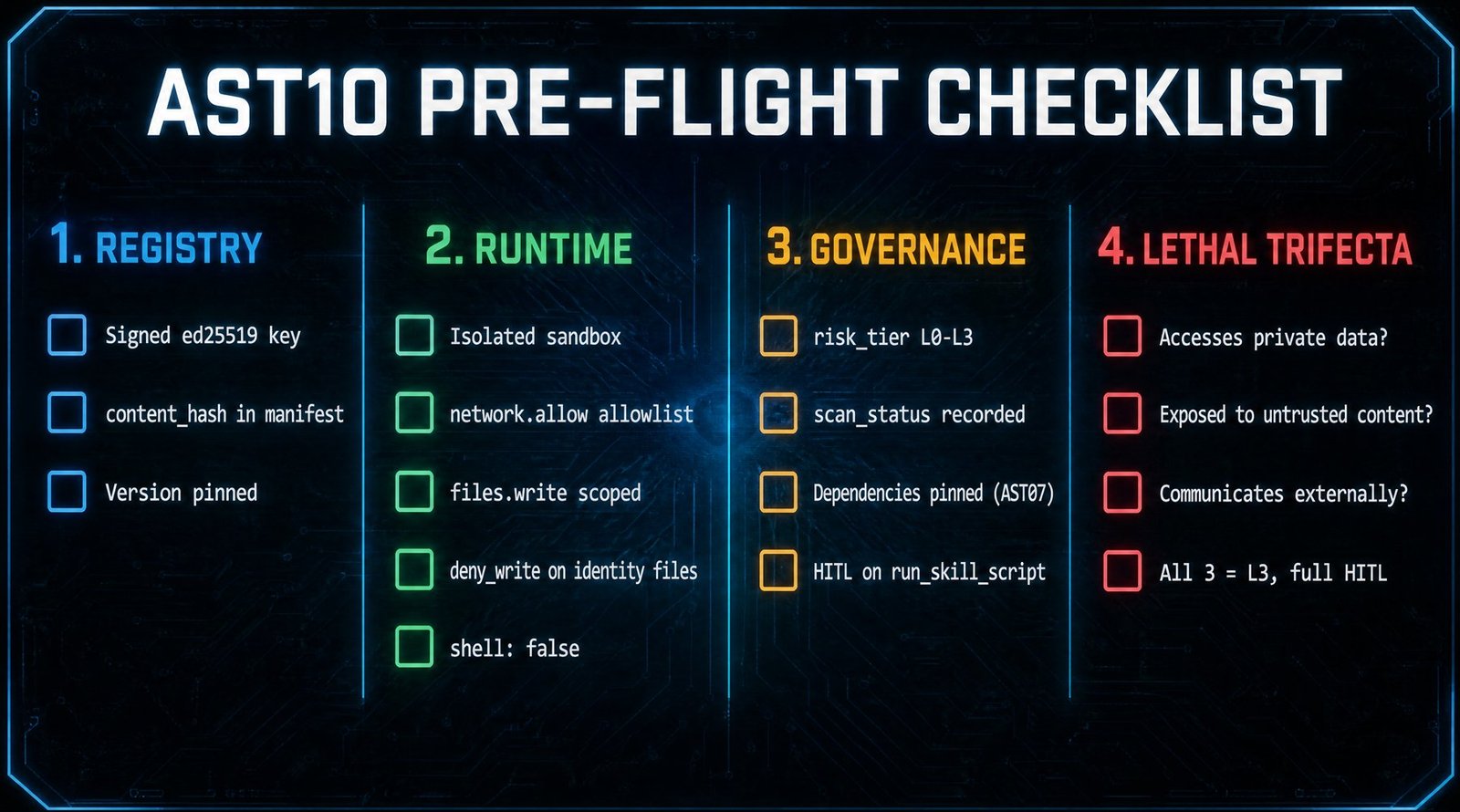
Registry and installation
- Skill is signed with an ed25519 key you control
-
content_hashis embedded in the manifest - Version is pinned (no
latest, no version ranges)
Runtime security
- Agent runs in an isolated environment (container or sandbox)
-
network.allowis an explicit domain allowlist, nottrue -
files.writeis scoped to the minimum required paths -
deny_writeprotects identity files (SOUL.md,MEMORY.md,AGENTS.md) and credential files -
shell: falseunless the skill genuinely needs shell access
Governance
-
risk_tieraccurately reflects the skill's blast radius (L0–L3) -
scan_statusrecords the scanner used and the result - All nested dependencies are pinned to immutable hashes (AST07)
- Human approval is enabled for
run_skill_scriptby default
Lethal Trifecta check
- Does the skill access private data? (credentials, keys, PII)
- Is the skill exposed to untrusted content? (web pages, emails, user input)
- Can the skill communicate externally? (network, webhooks)
- If all three are yes, the skill is L3 by default. Full HITL on every action.
Why this matters
Agent skills are the execution layer that gives AI agents real-world impact. They define not just what resources agents can access, but how they orchestrate multi-step workflows autonomously. Securing the model is not enough. Securing the protocol (MCP) is not enough. The behavior layer, the skills themselves, is where attackers are currently winning, and where most teams have zero coverage.
As a CISSP with both operator-level cyber defense and management-level security compliance experience, I see the same pattern in the AI agent ecosystem today that I've seen in every other software security crisis: a new execution layer that outpaced the controls designed to govern it. The patterns for fixing it are not new. Least privilege, signed artifacts, allowlist networking, sandboxed execution, audit logging — these are all things we already know how to do. The work is in actually doing them.
At Adam Does AI, I help small and mid-sized businesses deploy AI agents without blindly trusting the skill layer — from authoring hardened skills to standing up the governance framework around them. If you're building or scaling agents and want a second set of eyes on your stack, reach out or email me directly at adam@adamdoesai.com.
References:
- OWASP Agentic Skills Top 10 — owasp.org/www-project-agentic-skills-top-10
- Microsoft Agent Framework: Agent Skills for Python — devblogs.microsoft.com
- Snyk ToxicSkills Audit, Feb 2026